Fund Data, From Source to System
Straight-through processing for fund documents, validated against your master data.
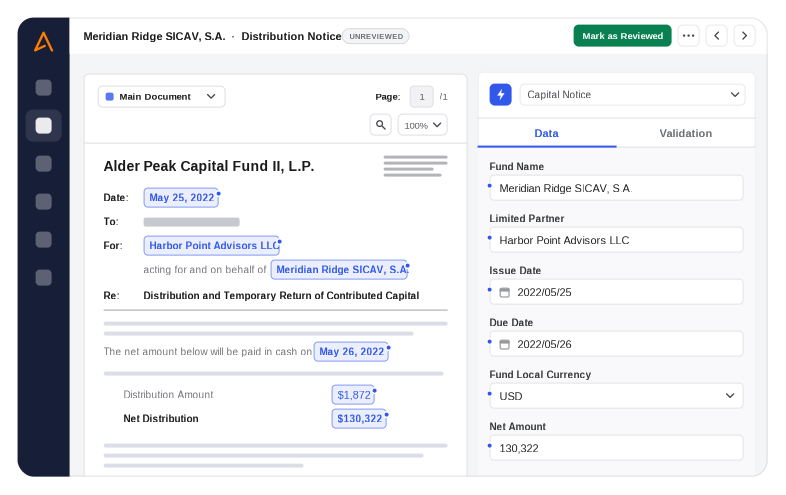
Alkymi Funds collects capital notices, capital account statements, and fund reports. It extracts the data and checks it against your fund and LP records before anything reaches your systems.
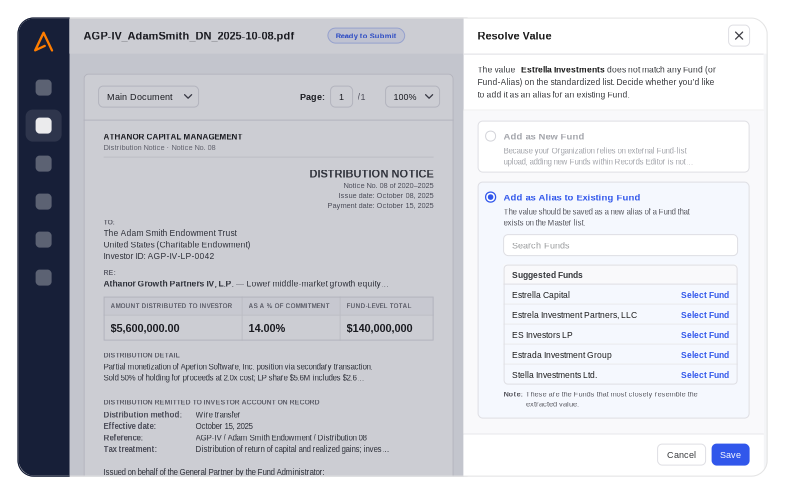
Clean data flows straight into your accounting, portfolio, and reporting platforms. Only exceptions reach your team, shown next to the source document with a suggested fix.
Managing Fund Data as Alternatives Portfolios Scale
Read the Full Alkymi Funds Announcement →Alkymi has become an integral part of our private markets operations. By leveraging Alkymi Funds patterns and features like the Data Inbox and Portal Download Service, we've eliminated manual workflows and improved both data accuracy and speed. The platform provides a single solution to manage all of our alternatives data, integrates easily into our existing systems, and seamlessly extracts, validates, and visualizes that data. Alkymi's automation allows us to operate at scale while maintaining the level of quality and reliability our clients expect.


Patterns That Power Alternatives Automation

Capital Notices
Automatically extract capital calls, distributions, and notice details. Keep commitment, contribution, and distribution data current without manual entry.

Capital Account Statements
Capture NAV, commitments, and performance metrics from capital account statements. Validate figures across reporting periods.

Schedules of Investments
Transform schedules of investments into structured holdings data. Gain consistent visibility into underlying positions across funds.
Validated Fund Data You Can Trust
Clean records flow straight through to downstream systems, while teams add their own validation rules, choose which ones flag exceptions, and decide when to require one- or two-step review.
Extract
Pre-built Patterns read capital notices, PCAPs, SOIs, and K-1s. Extend them with custom fields for the data your team tracks.
Validate
Built-in and custom rules check every record against fund, LP, and bank master records.
Review
The Review Agent spots anomalies, explains what's wrong, and proposes a fix.
Deliver
Records that pass publish directly to your downstream systems.
Master Data That Validates and Maps Every Record
Fund and LP master records power stronger validation and accurate data mapping into downstream systems.
Managing client and account data too?
Explore Alkymi Client Master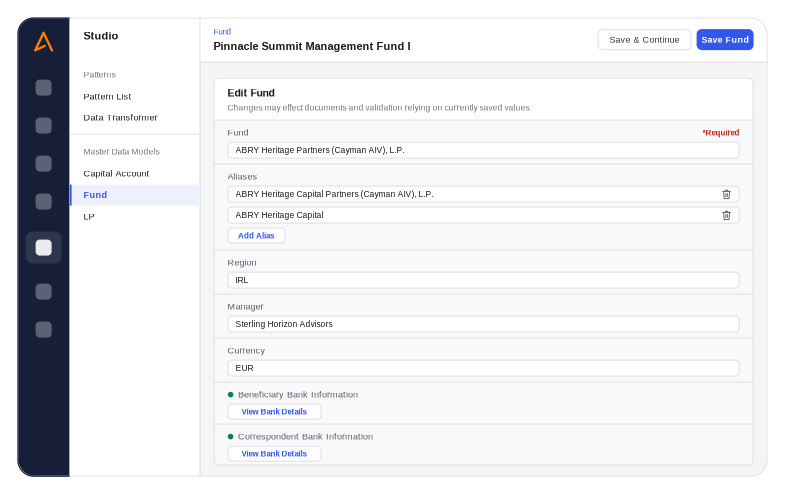

Validation Beyond the Document
Extracted values are checked against expected fund, LP, capital account, and bank details, so only records that match pass straight through.

Protection Against Wire Fraud
Bank details on every capital call are checked against the master record, so changed or unexpected wire instructions are flagged before any payment goes out.

One Name for Every Fund
Variations like "ABC Fund IV" and "ABC IV LP" map to one canonical fund, with aliases built from historical records and team input.

Mapped for Downstream Systems
Each fund and LP carries the identifiers, region, currency, and custom fields downstream systems expect, so records arrive mapped and ready to load.

Synced with Existing Data Platforms
Master records sync to and from existing data platforms, so every check runs against current reference data.

Fewer Exceptions Over Time
Each resolved mismatch becomes part of the master record, so the same exception doesn't come back and more records pass straight through every reporting period.
Built for the Full Alternatives Workflow

Document Collection
Automated retrieval from investor portals, including those secured with MFA, along with email, SFTP, and APIs.
Downstream Integration
Validated data loads directly into accounting, portfolio, and data platforms, including SimCorp, FINBOURNE, Investran, eFront, Snowflake, and Databricks.

Capital Call Alerts
Never miss a capital call. Get alerts for upcoming calls, distributions, and reporting deadlines, and know right away when an expected notice hasn't arrived.

Insights & Dashboards
Track NAV, commitments, contributions, distributions, and exposure across every fund and manager in one view, built on validated data you can trace back to the source document.
Access Control & Fund-Based Visibility
Control who sees what by fund, manager, or portfolio, so large operations teams can work in parallel without overexposing data. Users sign in through your existing SSO provider.
Four-Eyes Review
Separate the reviewer and approver roles so every record gets a second set of eyes before it's pushed downstream. Assign reviews to specific team members, and track every edit and approval in a full audit trail.

From Dense Fund Documents to Real‑Time Portfolio Insights
Designed For
Validated fund data for institutional investors, wealth managers, and service providers, so teams can forecast cash flow, manage liquidity, and meet capital obligations with confidence.

Investment Operations Teams
Reduce manual document handling and processing of capital activity across funds.
Portfolio Managers
Gain timely updates on NAV, commitments, and performance to make informed investment decisions.

Finance & Accounting Teams
Deliver validated fund data into accounting and reporting systems with a clear audit trail.

Fund Administrators
Scale processing across managers and funds without adding manual work.

Schedule a Demo of Alkymi
Interested in learning how Alkymi can help you go from unstructured fund documents to instantly actionable data? Schedule a personalized product demo with our team today!
Request a Demo
By submitting this form, you agree to Alkymi’s Privacy Policy. We’ll never share your information.